

If you asked your operations manager "how much time does our team spend re-typing data from one system into another every week," the answer is almost always more than they think. Somewhere in your building right now, a smart person you pay well is reading numbers off one screen and typing them into another, and calling it Tuesday. These are the five versions of that job we see most often at SMEs, what each one costs, and the realistic fix for each.
The five time sinks we see most often
Time sink 1: Order email or fax becomes ERP entry
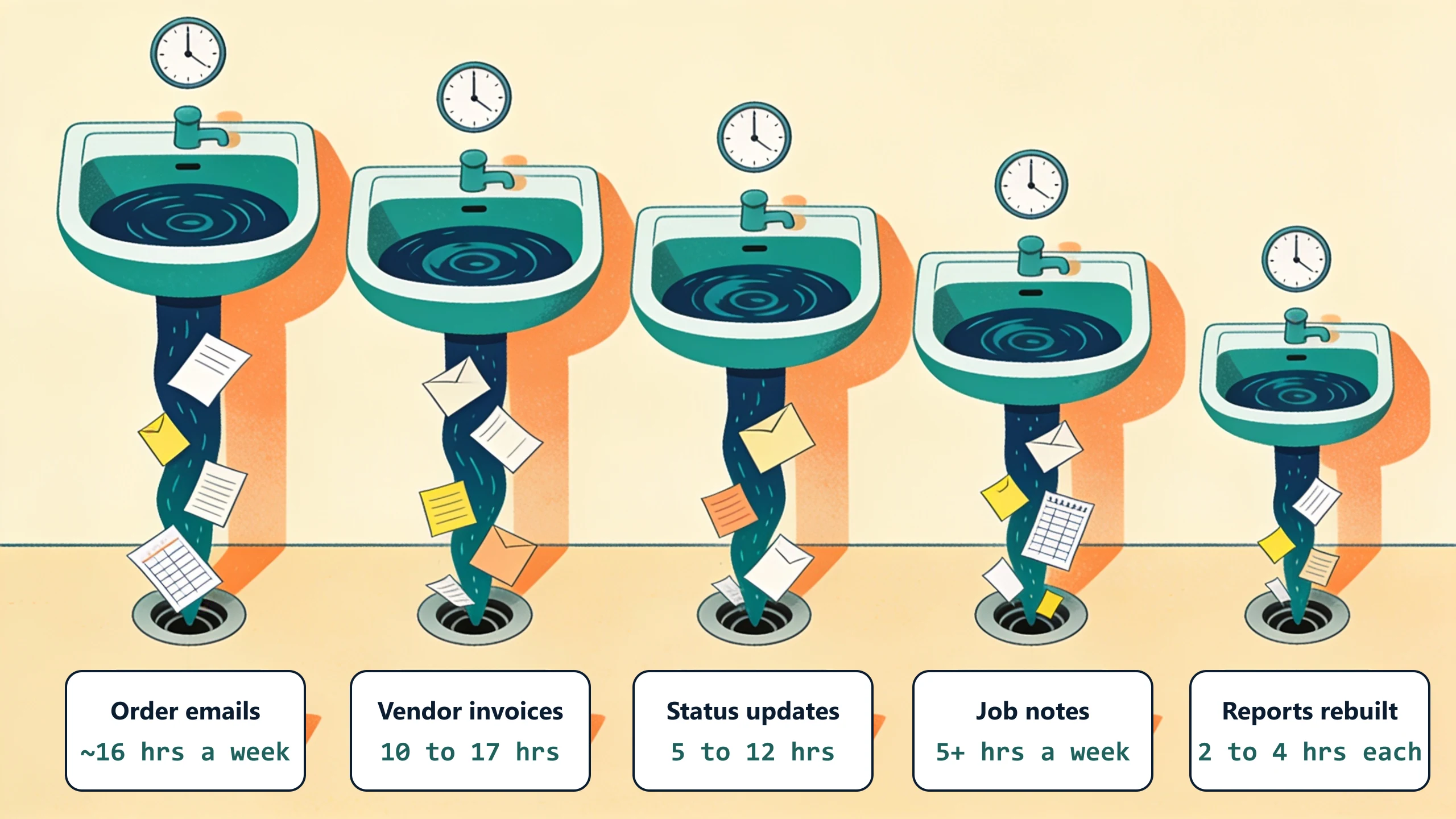
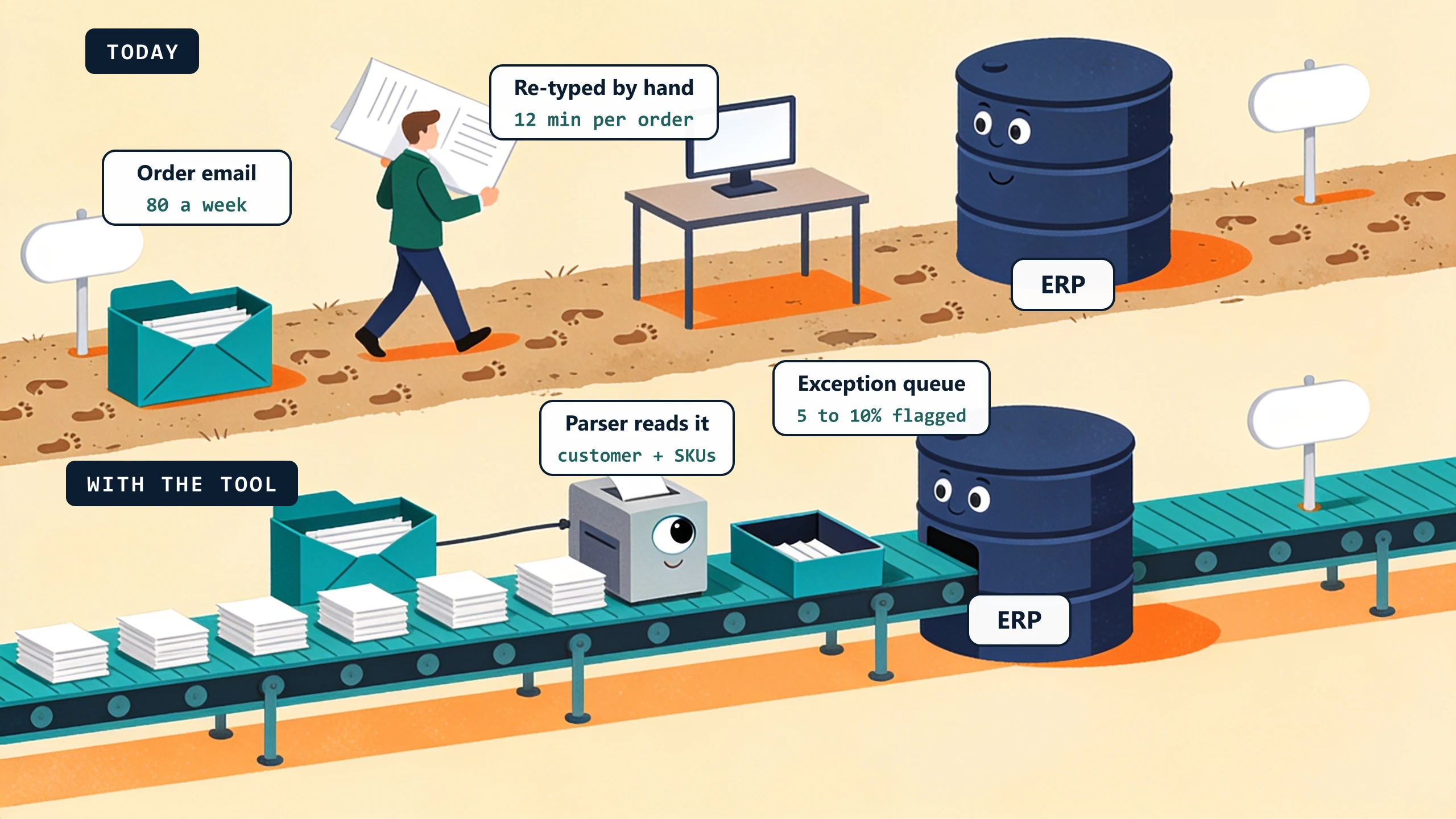
A customer emails an order. Or faxes it, because the fax machine will outlive us all. Inside sales reads it, opens the ERP, and starts typing: customer, parts, quantities, PO number. Twelve minutes per order, 80 orders a week. That is 16 hours of a good salesperson working as a courier between an inbox and a database.
The fix. Email parsing automation that reads the order, identifies the customer (fuzzy-match on email or name), maps SKUs (with a fallback to a human-review queue for unrecognized parts), and submits the order to the ERP. Inside sales reviews exceptions, not every line. See the multi-channel order intake example.
Time sink 2: Job completion becomes invoice
The tech marks the job complete and drives to the next one. The work is done; the money is not. Back at the office, someone reads the completion notes, opens QuickBooks, and rebuilds the whole job by hand: customer, parts, labor hours, discounts. Eight minutes per invoice, 40 invoices a week, 5.3 hours. And every one of those minutes delays the bill that pays for everything else.
The fix. Job-close trigger that pulls labor and materials from dispatch, applies the customer-specific pricing rules, generates the invoice, and posts to QuickBooks. Office manager reviews exceptions only. Same-day invoicing instead of weekly. See the auto-invoicing example.
Time sink 3: Spreadsheet rebuilds on a schedule
Every Monday morning, the same ritual: pull data from two or three systems, paste into Excel, patch the formulas, make it presentable, hit send. Two to four hours, gone before lunch. Most businesses run three to five of these rituals in parallel and file the whole thing under "reporting."
The fix. A scheduled job that pulls from the source systems, runs the formulas server-side, and emails the finished report to the same distribution list before anyone has had coffee. The 5-second version of a four-hour habit. See the professional services hub for examples.
Time sink 4: Cross-system status update
A job status changes in dispatch. Now someone updates it in project accounting. And on the customer portal. And in the CRM, if they remember. Thirty small edits a day at two to five minutes each comes to 1 to 2.5 hours a day, or 5 to 12 hours a week, spent telling computers things other computers already know.
The fix. Webhook or scheduled sync between the systems. Status update in System A propagates to B and C automatically. The right approach depends on whether the source system has a webhook (most do, in 2026) or whether you need to poll. See the call-to-CRM auto-routing example for a similar case.
Time sink 5: Vendor or supplier invoice reconciliation
Vendor invoices arrive by email, mail, and EDI. AP types them in, matches them against POs, matches them against receiving, chases the approval, files the paperwork. Twelve to twenty minutes per invoice, 50 invoices a week: 10 to 17 hours. It is the most tedious job in the building, and the most expensive one to get wrong.
The fix. AP automation that ingests vendor invoices (email parsing or OCR for paper), matches against POs and GRs in your ERP, routes for approval based on dollar threshold and category, and posts to AP automatically. Failures queue for human review. Standard capability in mid-tier ERPs but rarely well-configured at the SMB level.
The compound math
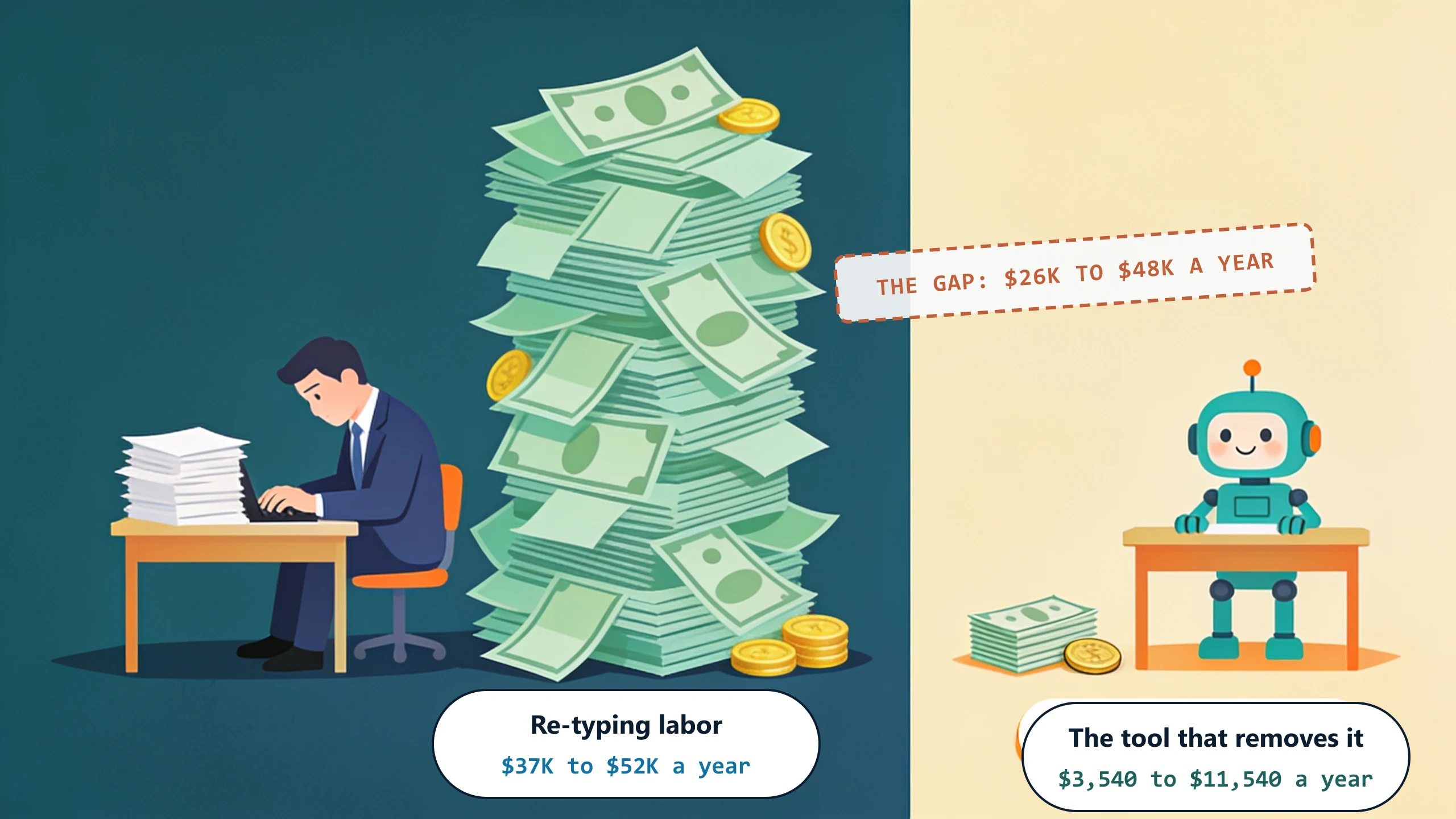
Add it up. A typical 30-employee business with two of the five running unaddressed is losing 18 to 25 hours per week to manual data entry. At a fully-loaded $40 per hour, that is $37,440 to $52,000 a year: a full salary, spent teaching two systems to talk through a human interpreter.
For comparison: the annual cost of a custom-plus-managed integration that addresses one of those time sinks is a fraction of that labor bill, from the Starter tier up through Scale. The math is not subtle.
How long it takes to break each time sink
The fix is more achievable than most owners expect, but the timeline depends on which time sink and which delivery model. Realistic ranges from the tools we build:
- Time sink 1 (order email to ERP): 1 to 3 weeks for the pilot. Email parsing is well-understood. The bottleneck is not the technology; it is enumerating the customer's actual customer-and-SKU lookup logic and edge cases. Most distributors have undocumented "if customer X, always send to warehouse 2" rules that surface only when you start codifying them.
- Time sink 2 (job to invoice): 2 to 3 weeks. The integration to dispatch and the integration to QuickBooks both exist. The custom work is in the customer-specific pricing rules and discount logic. Trade companies with 10 or more pricing exceptions take 3 weeks; companies with simpler pricing land at 2.
- Time sink 3 (recurring spreadsheet): 1 to 2 weeks. The simplest of the five to break. The hard part is locating every formula in the source spreadsheet and confirming the source-system data sources. Most teams discover during scoping that two formulas in the spreadsheet are actually wrong and have been wrong for years.
- Time sink 4 (cross-system status): 1 to 2 weeks. Webhook-driven syncs are fast to build when both systems support webhooks. Polling-based syncs (when one system does not) take 1 extra week and add a small ongoing reliability cost.
- Time sink 5 (vendor invoice reconciliation): 3 to 4 weeks. The most complex of the five. PO matching logic, GR matching logic, and approval routing each have customer-specific rules. The win is also the largest in dollars, often $15,000 per year of recovered AP-team time.
The first thing we rip out of a workflow is the re-keying step that bridges two systems, the place where a person reads one screen and types the same facts into another. We watch one full pass of that before touching anything, because that hour is where the undocumented rules hide, and scoping the pilot to one time sink at a time keeps the build honest.
What "broken" actually means in practice
Breaking one of these time sinks does not mean removing humans from the loop. It means the humans stop typing and start checking. A typical outcome:
- Before: 16 hours per week of typing.
- After: 2 to 3 hours per week of reviewing the 5 to 10 percent of cases the system flagged for human attention.
- Savings: 13 to 14 hours per week, redirected to work only a person can do, or absorbed as headcount avoidance.
The exception-review queue is also where errors get caught. Manual data entry runs a 1 to 4 percent error rate. A 2019 study of clinical transcription measured 3.7 percent of hand-keyed entries as discrepant from the automated result. Software that flags ambiguity for human review drives that rate down, because attention concentrates on the ambiguous cases instead of being diluted across every one.
What to do this week
Each of these is one handoff, which is the only unit of automation worth pricing. Pick the one that made you wince. Estimate the weekly hours, then assume you have undercounted, because most people do. Then walk us through it on a free 30-minute discovery call. We will tell you which of the four delivery models (read our cost-to-build post for the comparison) is right for your specific case.
No pitch, no pressure. We diagnose, you decide.
Have a question? We reply by email, no call needed.